Automate LinkedIn Outreach Without Getting Banned
January 9, 2026
Automating your LinkedIn outreach means using smart tools to handle the repetitive stuff—like sending connection requests and follow-ups. Done right, it transforms a manual, time-sucking grind into a predictable system for generating high-quality leads.
This isn't about blasting generic messages. The modern approach is all about precision and personalization at scale, letting you start real conversations with the right people, consistently and safely.
The Modern Playbook for LinkedIn Automation
Jumping into LinkedIn automation can feel like a minefield. One wrong move, and you could put your account at risk. But with a smart strategy, you can unlock a pipeline that practically runs itself.
The old "spray and pray" days are long gone. Sending thousands of generic connection requests just doesn't work anymore. LinkedIn has gotten smarter, and so have buyers. The new game is all about quality over quantity.
The entire landscape has shifted. We're now focused on precision and personalization at scale, a direct result of LinkedIn's own rule changes. By 2026, the platform is expected to have nearly 1 billion professionals, a massive jump from 2022. While that's a huge pool of prospects, LinkedIn has also tightened the reins, dropping the daily connection request limits from 80-100 down to a much safer 50-70.
So, what does that mean for you? Instead of sending 3,000 invites a month, you’re looking at around 1,000 to 1,400. Every single one has to count. This new reality makes a structured, compliant approach essential. You can discover more insights about the future of LinkedIn automation to stay ahead of the curve.
Success isn't about sending more messages; it's about starting the right conversations. It’s about turning a complicated process into a smooth engine for B2B growth.
The Core Pillars of Modern Automation
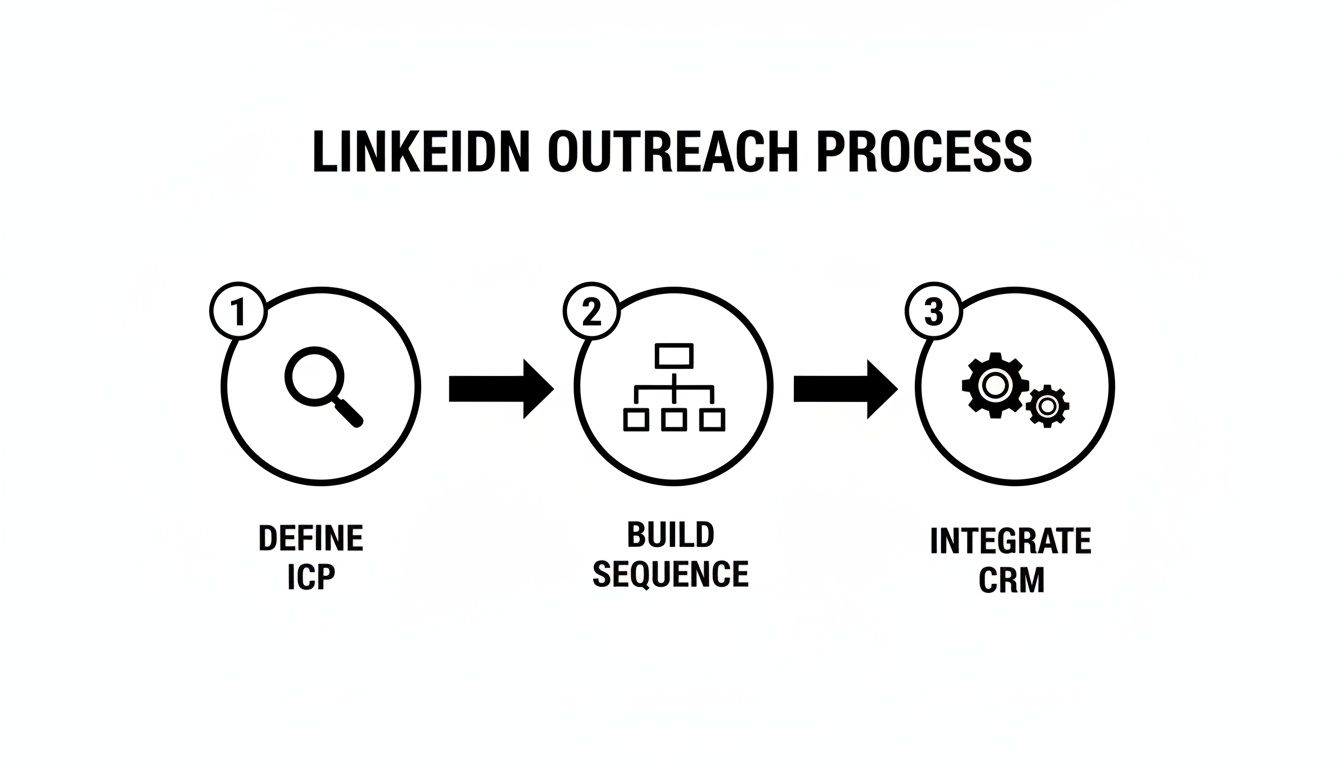
To build a system that actually works—and won't get you banned—you need to nail three fundamental pillars. Think of these as the legs of the stool; if one is wobbly, the whole thing comes crashing down.
- Define a Razor-Sharp ICP: Your Ideal Customer Profile is your North Star. Don't just stop at job titles. Dig deeper: company size, industry, what tech they use, and even recent buying signals like a new funding round. A truly precise ICP ensures your limited daily invites go to people who are actually likely to buy.
- Build Intelligent Sequences: A single message is easy to ignore. A multi-step sequence, on the other hand, mimics a natural conversation. It should blend connection requests with value-driven follow-ups and even simple actions like a profile view. This slow-burn approach builds familiarity and trust over time.
- Integrate with Your CRM: Your outreach tool shouldn't operate in a silo. By connecting it to your CRM—whether that's Salesforce or HubSpot—you guarantee that new leads and conversations are logged automatically. Nothing falls through the cracks.
This simple, three-part framework is the backbone of any successful LinkedIn automation strategy. It keeps your efforts targeted, measurable, and effective.
AI platforms like Roger are built to manage this entire motion for you. They can handle everything from finding the right decision-makers to personalizing every single touchpoint, helping you generate 30-60+ qualified leads per month, all while keeping your account safe and compliant.
Manual vs. Automated Outreach: A Quick Comparison
To really see the difference, it helps to put the old way and the new way side-by-side. The contrast in efficiency and potential results is stark.
| Activity | Manual Outreach | Automated Outreach (with AI) |
|---|---|---|
| Lead Sourcing | Hours spent scrolling Sales Navigator, exporting lists. | AI finds perfect-fit leads based on your ICP in minutes. |
| Personalization | Copy-pasting a template, maybe changing the name. | Hyper-personalized messages using real-time data points. |
| Sending Volume | A few dozen connection requests per day, inconsistently. | Consistently hits safe daily limits (50-70) every day. |
| Follow-Ups | Relies on memory or messy spreadsheets; often missed. | Multi-step sequences run automatically over weeks. |
| CRM Sync | Tedious, manual data entry for every interaction. | Leads and conversations logged in your CRM instantly. |
| Optimization | Guesswork based on a handful of replies. | A/B testing and data analysis to improve performance. |
Ultimately, automation isn't about removing the human element—it's about focusing it where it matters most: building relationships and closing deals.
Finding High-Intent Leads for Your Campaigns
Let's be blunt: your automation is only as good as the leads you feed it. You could write the most compelling outreach sequence in the world, but if you send it to the wrong person, it's just noise. To get real results from LinkedIn automation, you have to stop thinking in broad strokes like "job titles" and start hunting for high-intent buying signals.
Think of it like fishing. Targeting every "VP of Marketing" is like casting a massive, empty net and hoping for the best. But targeting "VPs of Marketing at Series B tech companies that just hired a Head of Sales and are actively using HubSpot"? That's spear fishing. It's precise, it's intentional, and it’s how you turn a generic campaign into a predictable lead machine.
This idea of precision outreach is the whole game. It's about building a repeatable system that gets the right message to the right person at the exact moment they need to hear it.
Defining Your High-Intent ICP
Everything starts with your Ideal Customer Profile (ICP). A high-intent ICP isn't just about demographics; it’s about identifying the specific triggers and attributes that signal a prospect is either actively looking for a solution like yours or is about to be.
Forget the basics for a second and dig deeper into these data points:
- Trigger Events: What's happening inside a company that signals an impending need? Think about a fresh round of funding, a new C-suite executive coming on board (like a new CMO or CRO), or a sudden hiring spree in a key department. These are golden opportunities.
- Technographics: What tools are they already using? Knowing their tech stack can reveal major gaps you can fill. For example, if they use Salesforce but don't have a sales engagement tool, that's your cue.
- Buying Signals: Pay attention to what people are doing on LinkedIn. Are they posting about a problem you solve? Liking a competitor's post? Sharing articles related to your field? These are active signs of interest.
A well-defined ICP doesn't just tell you who to target; it tells you why you should target them now. That context is everything when it comes to writing a personalized message that actually gets a reply.
Translating Your ICP into Actionable Searches
Once you've got this detailed ICP on paper, LinkedIn Sales Navigator becomes your best friend. It’s where you translate those abstract triggers and tech details into laser-focused searches that pull up your perfect-fit prospects.
This is where the magic really happens. You can stack multiple filters to create incredibly specific lists. For instance, a search might look something like this:
- Job Title: "VP of Sales" OR "Head of Revenue Operations"
- Company Headcount: "51-200 employees"
- Industry: "Computer Software"
- Keywords in Profile: Using a Boolean search like
"HubSpot" AND "Salesforce" - Recent Activity: Filtering for people who have "posted on LinkedIn in the last 30 days" or "changed jobs in the last 90 days."
This layered approach means every single person on your list meets your exact criteria. Now, the challenge is getting that data out efficiently to power your campaigns. If you want to get serious about pulling these high-intent leads from LinkedIn's premium tools, it's worth exploring the best tools for scraping LinkedIn Sales Navigator.
Sourcing and Verifying Your Lead List
Building the search is only half the battle. Next, you have to actually source those leads and, crucially, verify their contact info. A clean, verified list is non-negotiable if you plan on running a multi-channel sequence that includes email.
This is where verification tools are essential. They check data from multiple sources to confirm email addresses, which dramatically cuts down on your bounce rate. A high bounce rate is a huge red flag that can get your email domain blacklisted, effectively killing your entire outreach operation before it even gets off the ground.
Remember that SaaS company I mentioned? They tripled their meeting rate not because their messaging suddenly got three times better. It was because 100% of their outreach was aimed at people who had a genuine, immediate need for what they were selling. That’s the power of a finely-tuned ICP.
Crafting Outreach Sequences That Actually Convert
Look, a single connection request is a lottery ticket. A well-thought-out, multi-step sequence? That’s a strategy. If you want to automate your LinkedIn outreach and actually see results, you have to move past one-off messages. The goal is to design a series of touchpoints that build familiarity and feel less like a robot and more like a helpful, persistent conversation.
You're essentially mapping out a journey for your prospect. It starts with a good reason to connect, moves into follow-ups that offer real value, and even gives them a graceful way to opt-out. This strategic patience is what separates you from the army of spammers flooding their inbox.
The Anatomy of a High-Performing Sequence
A killer sequence isn't just a random blast of messages. Every step has a purpose. While you'll need to tweak the timing and content for your own audience, a solid framework always mixes active messaging with passive engagement.
Here’s a structure I’ve seen work time and time again:
- Touchpoint 1 (Day 1): Profile View + Connection Request. This is a simple but effective "warm-up." They see you've checked them out right before you send a personalized connection note.
- Touchpoint 2 (Day 3): Thank You & Add Value. Once they accept, follow up. But this is not a sales pitch. It’s a simple thank you and a quick, relevant insight or resource.
- Touchpoint 3 (Day 7): Engage with Their Content. A simple like or comment on a recent post they shared goes a long way. It’s a low-pressure way to stay on their radar.
- Touchpoint 4 (Day 10): The Problem-Focused Message. Now you can gently pivot. Reference a common pain point for someone in their role and frame it as a question. Something like, "Noticed you're leading the RevOps team at [Company]. Curious how you're handling [specific challenge] with the new Q4 goals?"
- Touchpoint 5 (Day 15): The Breakup Message. This is your last, polite message that gives them an easy out. You’d be surprised how many replies this one gets, precisely because it removes all the pressure.
This multi-touch approach is all about increasing your odds. The average cold outreach reply rate can be a dismal 10.3%, but a smart, personalized sequence can easily push that figure north of 30%.
Personalization That’s More Than Just a First Name
Generic, {{firstName}} templates are the fastest way to get ignored. Real personalization shows you’ve actually done your homework. It’s the difference between "Hi John," and "Hi John, I saw your recent post on generative AI for sales teams—great insights on prompt engineering."
One shows you have a list; the other shows you’re paying attention.
When you're writing your messages, think in terms of "research-driven openers." Ditch the generic compliments and reference something specific that connects their world to yours. This single tactic can skyrocket your reply rates because it proves you're not just another bot.
Keep an eye out for these personalization triggers:
- Recent Activity: "Your comment on that Gartner report about sales forecasting really stood out to me..."
- Company News: "Congrats on the recent Series B funding! I imagine scaling the sales team is a top priority..."
- Shared Connections: "I see we're both connected with Jane Doe. I've always been impressed with her work at [Previous Company]."
- Profile Keywords: "As a specialist in GTM strategy for SaaS, I was curious about your approach to..."
Weaving in Email for a Multi-Channel Approach
Putting all your eggs in the LinkedIn basket is risky. A truly powerful sequence integrates email to create a multi-channel conversation. This approach helps you capture attention without being aggressive because you’re meeting people where they are.
A blended sequence might look something like this:
| Day | Channel | Action |
|---|---|---|
| 1 | View Profile & Send Connection Request | |
| 3 | Follow-up Message 1 (Value Add) | |
| 5 | Email 1 (Introduce the problem) | |
| 8 | Like or comment on a post | |
| 12 | Email 2 (Share a case study or resource) | |
| 16 | Follow-up Message 2 (The "Breakup" note) |
By spreading your touchpoints across different channels, your message has a much higher chance of being seen. It shows persistence without being annoying and respects that people have different communication preferences. The real key here is making sure your messaging is cohesive—you're telling one continuous story, not starting a new, jarring conversation with every message. That thoughtful orchestration is what turns amateur automation into a professional lead-gen engine.
Building a Compliant and Effective Tech Stack
Automating your LinkedIn outreach isn't just about picking a tool; it's about building an engine. The right tech stack turns the manual, repetitive grind of prospecting into a predictable lead generation machine. But get this part wrong, and you're looking at poor results or, even worse, a suspended account.
Your core automation platform is the foundation. Don't settle for something that just blasts out messages. You need a tool that offers intelligent orchestration—think AI-powered lead discovery, dynamic personalization that pulls from real-time data, and analytics that actually tell you what's working and what's not.
Also, native CRM integration is non-negotiable. Your outreach tool must talk to your CRM, whether it's HubSpot, Salesforce, or something else. New leads, conversations, and status changes should sync automatically. This creates a single source of truth and stops warm leads from falling through the cracks as they move from LinkedIn into your sales pipeline.
Prioritizing Safety and Compliance
Compliance isn't just a box to check; it’s the key to making this strategy work long-term. LinkedIn is fiercely protective of its user experience, and it's constantly on the lookout for spammy, robotic behavior. This is where your choice of technology is absolutely critical.
The biggest mistake I see people make is choosing a tool based on flashy features alone, without ever looking under the hood at its safety protocols. A tool that gets your account banned is a liability, no matter how many bells and whistles it has.
The most important distinction here is between browser extensions and cloud-based platforms. Browser extensions run from your local computer, making it easy for LinkedIn to flag your activity through your IP address and browser fingerprint.
Cloud-based tools, on the other hand, operate from a secure, dedicated server—often with a unique IP address just for your account. This looks much more like natural human behavior to LinkedIn and is significantly safer.
Operating Within LinkedIn’s Guardrails
Even with the safest tool, you still have to play by the rules. Think of it like driving a supercar; you have the power, but you still need to obey the speed limits.
To keep your account healthy and in good standing, stick to these fundamentals:
- Respect Connection Limits: LinkedIn has an unofficial weekly limit of around 100-200 connection requests. A good automation platform will have built-in safety throttles to manage this for you, spacing out requests at randomized, human-like intervals.
- Warm Up Your Account: Don't go from zero to one hundred. If your account is new or hasn't been very active, you need a warm-up period. Start with just 10-15 actions per day and gradually increase your activity over several weeks.
- Monitor Your Acceptance Rate: This is a huge one. If your connection acceptance rate consistently drops below 20%, it sends a clear signal to LinkedIn that your outreach is unwanted. This dramatically increases your risk of getting flagged.
As you build out your stack, understanding the various LinkedIn API solutions available can give you an edge, offering more stable and integrated ways to manage data than other methods.
Ultimately, putting together the right tech stack is a balancing act between power and prudence. The goal is to find tools that not only help you scale but also protect your most valuable asset: your professional reputation and the LinkedIn account you've worked so hard to build.
You can't improve what you don't measure. Setting up an automated LinkedIn outreach machine is one thing, but turning it into a predictable pipeline generator? That comes down to religiously tracking your data and knowing what’s actually working.
Too many teams fall into the trap of chasing vanity metrics like profile views or likes. They feel good, but they don’t pay the bills. The real goal is to focus on the numbers that directly lead to revenue. This shift from "busy" to "productive" is what separates campaigns that fizzle out from those that consistently book meetings.
Identifying Your Core KPIs
To start optimizing, you need a dashboard. Forget the fluff—these four KPIs are your true north, guiding every tweak you make to your strategy.
- Connection Acceptance Rate: This is your foot in the door. It tells you point-blank if your targeting is on point and if your connection request message is compelling. If this number is low, nothing else matters.
- Reply Rate: Once you're connected, are people actually engaging? This number is a direct reflection of how well your messaging resonates with the audience.
- Positive Reply Rate: Let's be honest, not all replies are good news. This metric cuts through the noise of "no, thanks" and hones in on prospects showing genuine interest. It’s a much better indicator of pipeline health.
- Meetings Booked: The ultimate bottom-line metric. How many of those positive conversations are turning into actual sales appointments? This is where the rubber meets the road.
Once you have a handle on these numbers, you can start comparing them to industry standards to find your biggest opportunities for improvement.
Understanding Industry Benchmarks
There's a reason B2B teams are doubling down on their efforts to automate LinkedIn outreach. Statistically, it’s one of the highest-yield channels available. Research shows that a staggering 89% of B2B marketers use LinkedIn for lead generation, and 62% of them confirm it works.
A solid connection acceptance rate today hovers in the 30-45% range, with reply rates often hitting 30-50%. When you compare that to cold email, where many campaigns struggle to break a 10% reply rate, you can see why LinkedIn can deliver 3x the engagement. You can dig into more detailed LinkedIn outreach stats to see how top performers are getting these results.
For sales leaders, this math is powerful. A single rep sending 60-70 highly targeted requests per day can open dozens of new conversations every week, transforming the top of the funnel from an inconsistent trickle into a predictable flow.
So, how does your performance stack up? Here’s a quick-glance table to help you gauge where you are and where you need to be.
Key LinkedIn Outreach Metrics and Industry Benchmarks
This table summarizes the most important metrics for your automated LinkedIn campaigns, along with industry benchmarks to aim for.
| Metric | Good Benchmark | Excellent Benchmark |
|---|---|---|
| Connection Acceptance Rate | 30% - 40% | 45%+ |
| Reply Rate | 30% - 50% | 55%+ |
| Positive Reply Rate | 15% - 25% | 30%+ |
| Meetings Booked Rate | 5% - 8% (of replies) | 10%+ (of replies) |
Seeing your numbers against these benchmarks will instantly highlight the weakest link in your funnel, telling you exactly where to focus your optimization efforts first.
The Power of A/B Testing
With your baseline metrics in hand, it’s time to start experimenting. A/B testing is your best friend here. The key is to change one variable at a time so you can clearly see what moves the needle. Testing everything at once just creates noise and leaves you guessing.
Here are a few high-impact areas to start with:
- Message Copy: Try a problem-focused opener versus a solution-focused one. Pit a casual tone against a more formal one. Test questions versus statements. Small changes can make a huge difference.
- Follow-up Timing: Is a 3-day gap between messages better than 5 days? Test your cadence to find the sweet spot between being persistent and just being annoying.
- ICP Segments: Sometimes the message is perfect, but the audience is slightly off. Test your campaign against different micro-segments of your ICP. For example, run the same sequence for VPs at Series A companies versus VPs at Series B companies and see which one performs better.
Think about this real-world scenario. A SaaS sales team had a decent 25% acceptance rate, but their reply rate was a dismal 12%. Their first message was all about their product's benefits—a classic solution-focused pitch.
They decided to test a new version. This one was problem-focused, simply asking how the prospect was handling a specific industry challenge, with no mention of their software at all. The results were immediate. The new message hit a nerve, and their reply rate shot up to 42%. That one simple test turned a mediocre campaign into their number one source of qualified demos, all because they let the data lead the way.
Your Top LinkedIn Automation Questions, Answered
Jumping into LinkedIn automation always kicks up a few crucial questions. It's only natural. You're thinking about the rules, trying to pick the right software, and most importantly, making sure your account stays safe. Getting straight answers to these questions is the first real step toward building a lead generation machine that actually works—and lasts.
Let's cut through the noise and tackle the big concerns head-on. This isn't about gaming the system. It’s about understanding how to work with the platform to scale your outreach without getting your hand slapped.
Is Automating LinkedIn Actually Safe?
Yes, but with a huge asterisk: it all comes down to how you do it. LinkedIn’s main job is to protect its users from spam, so anything that looks and feels robotic is going to get flagged. Your entire strategy has to revolve around mimicking real, human behavior.
The biggest mistake I see people make is using cheap, clunky browser extensions. These tools piggyback on your local browser and IP address, leaving a digital footprint that’s incredibly easy for LinkedIn to spot. A sudden, massive spike in activity from one of these is a bright red flag.
Cloud-based platforms are in a different league entirely. They operate from a dedicated server, usually with a unique IP address for your account, which makes your activity look far more organic. Plus, they have safety features baked right in, like automatically slowing down actions and randomizing the time between them so you stay well under the radar.
What Are the Daily and Weekly Limits?
LinkedIn is intentionally vague here—they don't publish a hard-and-fast rulebook. The limits can shift based on things like your account's age, how active you are, and your Social Selling Index (SSI) score. But after years of testing and seeing what works, the industry has settled on a solid set of best practices.
- Weekly Connection Requests: Stick to 100-200 connection requests per week. This is the big one. Going over this limit is the fastest ticket to a restricted account.
- Daily Profile Views: A good, safe number to aim for is between 100-150 views a day.
- Daily Messages: Once you're connected, you have more leeway. Sending around 100-150 follow-up messages per day to your network is generally fine.
Any decent automation tool will have these guardrails built in. It will automatically pace your activity throughout the day, so you don't have suspicious bursts of outreach at 9 AM and then silence for the rest of the day.
Look, the goal isn't to redline your account every single day. It's to build a consistent, human-like rhythm of activity that grows your network and fills your pipeline over the long haul. Smart automation is a marathon, not a sprint.
Cloud-Based Tools vs. Browser Extensions: What’s the Real Difference?
This is probably the most important decision you'll make. Browser extensions might seem tempting because they're cheap, but the risk you take on is massive.
| Feature | Browser Extension | Cloud-Based Platform |
|---|---|---|
| Operation | Runs locally from your computer's browser and IP. | Runs 24/7 from a secure, dedicated cloud server. |
| Safety | High risk. Easily detected through browser fingerprinting. | Much safer. Uses dedicated IPs and mimics human behavior. |
| Convenience | Your computer has to be on and LinkedIn must be open. | Set it and forget it. Runs even when your laptop is closed. |
| Best For | Honestly? Not recommended for serious, long-term outreach. | B2B teams who need safe, scalable lead generation. |
The verdict from anyone who’s been in the trenches is clear: if you’re a serious B2B team looking to automate LinkedIn outreach, a cloud-based solution is the only real choice for long-term safety and success. That small extra investment is your insurance policy for protecting your most valuable professional network.
Ready to build a predictable pipeline without risking your account? Roger is the AI-powered sales platform that runs your entire outbound motion for you—from finding perfect-fit leads to sending hyper-personalized, multi-channel sequences. Let Roger handle the prospecting while you focus on closing deals. Book your demo today!