How to Improve Email Deliverability and Land in the Inbox
December 7, 2025

Getting your emails to land in the inbox isn't a matter of luck—it's a science. To consistently improve email deliverability, you need the right combination of technical setup, clean contact lists, and smart sending practices. This is how you show inbox providers like Google and Microsoft that you're a legitimate sender, not a spammer.
Why Your Emails End Up in Spam
It’s a scenario every B2B team knows and dreads. You’ve put in the work—crafting the perfect message for your ideal customer—only for your email to disappear into the spam folder. This isn't just a random fluke; it’s a clear sign that mailbox providers don't trust your sending domain.
Think of your sender reputation as a credit score for your domain. Every single email you send either builds or erodes that score. A low reputation gets your messages flagged as suspicious, which kills your chances of ever being seen. The first step to fixing this is figuring out what's going wrong. For a closer look at common mistakes, this guide on understanding why emails end up in spam is a great place to start.
The Core Pillars of Deliverability
At the end of the day, good deliverability is all about proving you're legit. This process is built on three core pillars that work together to build and protect your reputation with inbox providers.
To truly grasp how these elements work together, it's helpful to see them laid out. Here’s a quick breakdown of what matters most and why.
The Core Pillars of Email Deliverability
| Pillar | Primary Goal | Key Actions |
|---|---|---|
| Technical Setup | Prove your identity and prevent forgery. | Implement SPF, DKIM, and DMARC to authenticate your sending domain. |
| Sender Reputation | Build trust with mailbox providers over time. | Warm up domains, maintain low bounce and complaint rates, and monitor blacklists. |
| Content & Engagement | Show that your emails are wanted and valuable to recipients. | Personalize messages, avoid spam triggers, and track opens, clicks, and replies. |
These components are the foundation of any successful outbound strategy. They signal to the world that you're a trustworthy sender.
The impact of getting this right is huge. In North America, for example, the average inbox placement rate is a staggering 87.9%. Why? Because of widespread adoption of these authentication standards and stricter enforcement of bulk sending rules. It just goes to show how essential a solid technical foundation is.
Inbox providers have one job: protect their users from junk mail. Your job is to prove to their algorithms that your outreach is valuable, relevant, and—most importantly—legitimate. Nailing these pillars isn't optional; it's the price of admission.
Ultimately, mastering these elements is what separates a pipeline-generating machine from a blacklisted domain.
Laying the Technical Groundwork for Your Outreach
Before you even think about writing a subject line, you need to prove to the world’s inbox providers that you're a legitimate sender. This isn't about clever copy or flashy templates; it's about building technical trust from the ground up.
Without this solid foundation, even the most perfectly crafted outreach campaign is dead on arrival, destined for the spam folder.
This entire foundation rests on three critical authentication protocols: SPF, DKIM, and DMARC. Think of them as your domain's digital passport, driver's license, and notarized signature all rolled into one. They work in tandem to prove you are who you say you are, shielding your reputation from scammers and spoofers.
Decoding the Authentication Trio
Getting these technical records right is the single most important thing you can do for your email deliverability. Each one plays a specific role, creating layers of security that inbox providers like Google and Microsoft actively look for.
SPF (Sender Policy Framework): This is basically a public list of all the servers authorized to send email for your domain. It’s like telling an inbox provider, "Only trust emails coming from these specific IP addresses. If you see my domain on an email from anywhere else, it’s not from me."
DKIM (DomainKeys Identified Mail): This attaches a unique, tamper-proof digital signature to every email you send. When the message arrives, the recipient's server checks that signature against your public key. If they match, it proves the email hasn't been altered along the way. It’s the digital equivalent of a wax seal on a letter.
DMARC (Domain-based Message Authentication, Reporting & Conformance): DMARC is the muscle. It gives clear instructions to inbox providers on what to do with emails that fail the SPF or DKIM checks—quarantine them, reject them entirely, or do nothing. It also sends you reports, giving you a priceless look into who is trying to send email using your domain.
Setting up all three isn’t just a "nice-to-have." It's a non-negotiable for anyone serious about B2B outreach. Skipping even one leaves your domain exposed and tells spam filters you might not be a sender they can trust.
Your technical setup is your first impression with an inbox provider. A missing SPF record or a failed DKIM signature is the digital equivalent of showing up to a business meeting in sweatpants. It instantly undermines your credibility.
Why a Custom Tracking Domain is a Game-Changer
Most sales outreach platforms use tracking pixels to see who's opening your emails and clicking your links. The problem? By default, those tracking links often point back to the platform's shared domain, not your own. This creates a disconnect that can quietly sabotage your sender reputation.
When you set up a custom tracking domain, you align those links with your own brand. It's a small change with an outsized impact:
- It creates sender reputation continuity. Every signal—from the sending server to the tracking links—points back to your domain, strengthening its authority.
- It protects you from the "bad neighbor" effect. You won't be penalized if another company on the same shared tracking domain engages in spammy behavior.
- It looks far more professional. Recipients see your company's URL in the links, not some third-party platform they don't recognize.
Taking this step gives you complete control over your sending infrastructure. It’s a clear signal to mailbox providers that you’re a legitimate business that takes its sending practices seriously.
This diagram from Wikipedia illustrates how the DKIM signature is added to an email's header, creating a verifiable link between the message and the sending domain.
This cryptographic signature is the key that allows receiving mail servers to confirm your email's integrity. It’s the concrete proof that your message is authentic and hasn't been messed with.
Platforms like Roger can help you get all of this right from the very beginning. Roger ensures these technical fundamentals are correctly configured, giving you the solid framework you need to protect your domain and dramatically increase your chances of hitting the inbox. Proper authentication isn't just about avoiding spam folders; it's about building the foundation for outreach that can actually scale.
The Art of Building a Clean Email List

So, your technical setup is perfect, and your domain has all the credibility it needs. But the real question is: who are you actually emailing? The quality of your contact list is just as critical as your authentication records—maybe even more so. A pristine, well-maintained list is a clear signal to inbox providers that your outreach is thoughtful and valuable.
Sending emails to invalid, outdated, or uninterested contacts will torpedo your sender reputation faster than anything else. It's like shouting into an empty room. Not only is nobody listening, but the noise you’re making actively damages your chances of reaching anyone in the future.
Why List Hygiene Is Not a One-Time Task
Too many teams fall into the trap of treating list building as a numbers game, focusing only on quantity. That approach is a ticking time bomb. Every single "bad" email address on your list—a typo, an old role, a hidden spam trap—creeps your bounce rate up and tells spam filters you’re not a careful sender.
The fallout can be severe. A single outbound campaign to a poorly vetted list can trigger a wave of hard bounces, getting your domain flagged almost instantly. This is why ongoing list hygiene isn't just a best practice; it's absolutely essential if you want to improve your email deliverability for the long haul.
Think about the sheer volume of email traffic out there. Over 347 billion emails are sent every day, and a staggering 16.9% of them never even reach an inbox because of deliverability issues. Things like a poor sender reputation or hitting spam traps are huge contributors to this, drawing a direct line between a clean list and successful outreach.
A clean email list is your best defense against deliverability issues. It’s not just about removing bad contacts; it’s about strategically focusing your efforts on prospects who are most likely to engage, which is what inbox providers want to see.
The Role of Email Verification
Never assume an email address is valid just because you found it somewhere. It’s a rookie mistake. People change jobs, companies get acquired, and typos happen constantly. This is where email verification services become a non-negotiable part of your workflow.
These tools essentially ping a mail server to see if an address is active and can receive mail, all without actually sending an email. This simple check delivers some massive benefits:
- Drastically Reduces Bounce Rates: By weeding out invalid addresses before you send, you can keep your hard bounce rate near zero, which is crucial for protecting your sender reputation.
- Identifies Risky Contacts: Good verifiers can also flag "catch-all" addresses (which often have low engagement) and even known complainers.
- Avoids Spam Traps: Spam traps are landmines. They are email addresses used by inbox providers and anti-spam services specifically to catch spammers. Hitting just one can get your domain blacklisted. Verification is your best shield.
For instance, platforms like Roger build email verification right into the prospecting workflow. As Roger uncovers potential decision-makers, it automatically validates their email addresses in real-time. This ensures that every contact you add to a sequence is deliverable, safeguarding your domain's health from the very beginning.
Building Your List with Quality and Compliance in Mind
A clean list is also a compliant one. Sourcing contacts ethically and respecting privacy rules is fundamental to good deliverability. Building a quality list means sticking to legal frameworks; it’s always a good idea to consult a GDPR compliance checklist to make sure your practices are up to date.
Ultimately, your email list is a valuable asset. Protecting its quality is a continuous process that involves verification, regular cleaning, and an unwavering commitment to sending relevant content only to the right people. That strategic focus is what turns a simple list of contacts into a powerful pipeline-generating machine.
Writing Emails People Actually Want to Read
So, your technical foundation is solid and your prospect list is squeaky clean. Now for the part that truly matters: writing an email that someone will actually open and read.
What you write is a direct signal to providers like Google and Microsoft. Every single email sends a message about you. Are you offering something of value, or are you just adding to the digital noise?
Think about it this way: every time a prospect opens, clicks, or—even better—replies, you're sending a powerful positive signal to their inbox provider. This is hands-down one of the most effective ways to build and protect your sender reputation, ensuring you land in the primary inbox, not the junk folder.
Crafting a Subject Line That Earns the Open
Your subject line is everything. It’s the gatekeeper. Get it wrong, and the brilliant email you wrote will never see the light of day. A weak subject line doesn't just get ignored; it can get you flagged as spam before your message is ever even seen.
My advice? Ditch the clickbait, the ALL CAPS, and the crazy punctuation. In my experience, the best B2B subject lines are simple, direct, and hint at the value inside.
Here are a few guidelines that have never failed me:
- Be Specific and Relevant: "Quick Question" is lazy. "Question about [Prospect's Company]'s sales process" shows you've at least done a minute of research. It immediately frames the conversation around them, not you.
- Keep it Human: Write like you’re emailing one person, because you are. A simple, lowercase subject line often cuts through the noise and feels far more authentic than a slick, marketing-style header.
- Create Curiosity, Not Hype: Spam filters have a long memory for words like "Free," "Guaranteed," or "Last Chance." Instead, spark their interest. Something like "Idea for your Q4 growth" or "Intro from [Mutual Connection]" works wonders.
Writing Copy That Feels Personal and Drives Replies
Once they open the email, you've got maybe five seconds to prove you're worth their time. The secret is to stop talking about yourself and start talking about them. Shift the entire focus from what you're selling to a problem they're likely facing.
Personalization is so much more than just dropping in a
{firstName}tag. Real personalization shows you understand their role, know about their company's recent wins, or have insight into a challenge unique to their industry. It's the proof that your email isn't just another automated blast.
For example, referencing a recent LinkedIn article they shared or a new company initiative you saw in the news is a game-changer. It shows you’ve done your homework. This is exactly where tools like Roger come in. Roger's AI researches each prospect, analyzing their social profiles and company news to help you craft opening lines that are genuinely relevant. It transforms a cold email into what feels like a one-to-one conversation.
This tailored approach doesn't just skyrocket your reply rates; it builds the exact kind of positive engagement that mailbox providers want to see.
Balancing Your Content for Deliverability
Spam filters don't just read words; they analyze the entire structure of your email. Getting the little technical details right inside the message itself is critical.
Keep these content guardrails in mind:
- Watch the Text-to-HTML Ratio: An email that's all flashy images and buttons with very little text is a classic spam red flag. Strive for a healthy balance, making sure you have plenty of plain text.
- Be Smart About Links: Don't litter your email with links. One or two strategic links—maybe one to your calendar and another to a relevant case study—are plenty. Too many links, especially from URL shorteners, look suspicious and can hurt your deliverability.
- Avoid Spam-Trigger Words: Filters are much smarter than they used to be, but certain words can still trip them up. Be cautious with overly salesy language ("amazing offer," "buy now"), urgent commands, and anything related to finance or guarantees.
Ultimately, your mission is to write something a real person would find genuinely helpful. When you focus on value and true personalization, you kickstart a powerful positive feedback loop. Your recipients engage, your sender reputation climbs, and your emails consistently land right where they belong: the inbox.
Mastering Your Sender Reputation
Okay, you've got the technical foundation set up. Now the real work starts. Your sender reputation isn't something you can just "set and forget." Think of it as a living, breathing score that inbox providers like Google and Outlook are constantly adjusting based on everything you send.
One of the fastest ways to get blacklisted? Firing off a massive email blast from a brand-new domain. It's a rookie mistake, and it's lethal to your outreach efforts.
Instead, you need a smart, long-term strategy. This means methodically warming up your domain, being strategic about how many emails you send and when, and having a game plan for bounces and complaints. This is the ongoing care that keeps your outreach engine running smoothly for the long haul.
This whole process is really a continuous cycle.
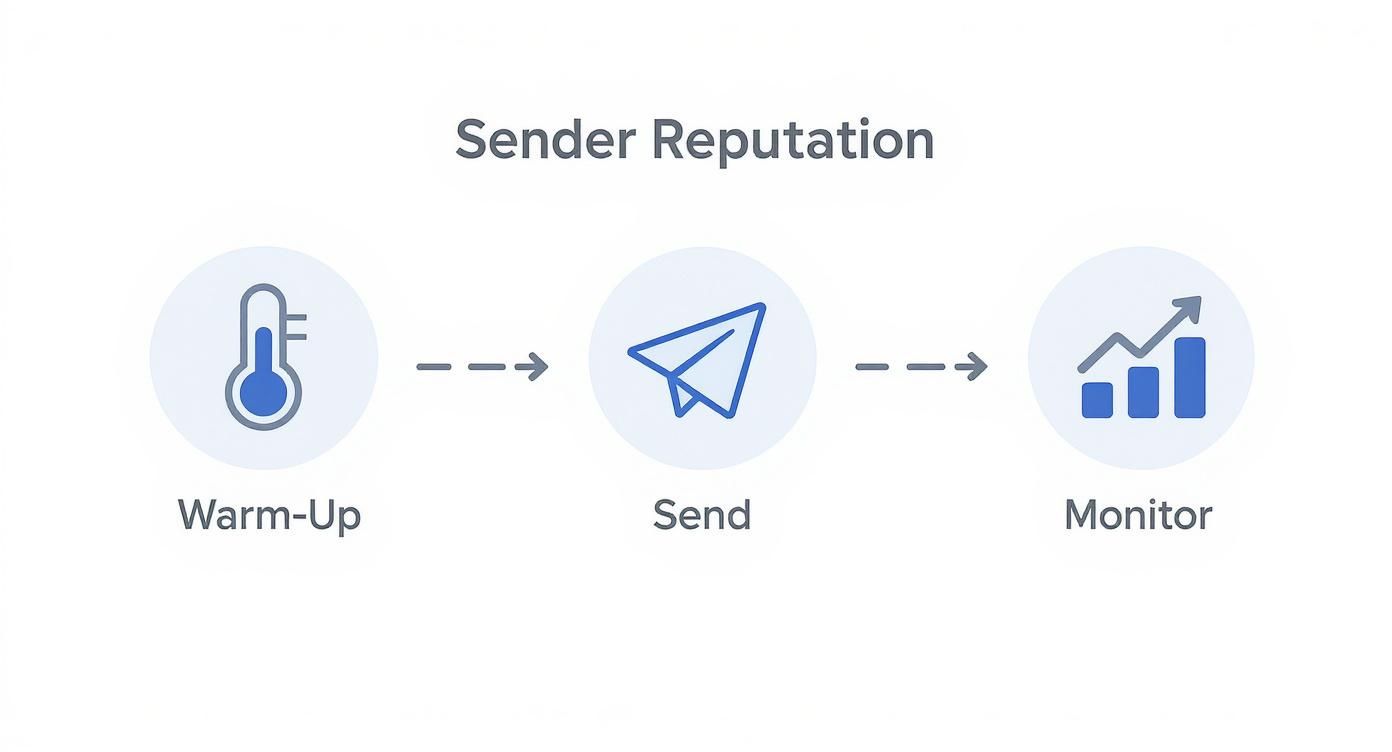
You warm up your domain, send your campaigns, and watch the results like a hawk. The data you gather then informs your next move, helping you protect and even improve your reputation over time.
The Make-or-Break Importance of a Domain Warm-Up
A new sending domain is essentially on probation. Inbox providers don't trust it one bit. The "warm-up" is how you earn that trust. You start by sending a very small number of high-quality emails and then, over several weeks, you slowly ramp up the volume.
This slow, steady approach signals to Google and Microsoft that you’re a legitimate sender, not a spammer getting ready to unload. I've seen countless teams torpedo their entire outreach strategy by getting impatient here.
A solid warm-up schedule usually looks something like this:
- Week 1: Start small. Send just 20-30 emails a day, and make sure they're going to your most engaged contacts or internal test accounts.
- Week 2: Time to ramp up a little. Increase to 50-70 emails per day. Keep a close eye on your open and reply rates.
- Week 3: Double the volume to 100-150 emails daily. Your bounce rate must stay below 3%. If it creeps up, pull back.
- Week 4 & Beyond: Keep gradually increasing your volume, but only if your engagement metrics are looking healthy.
Rushing a warm-up is like trying to sprint a marathon. You'll burn out your reputation before you even get started. Patience is the single most important asset you have in this phase.
Smart Sending Cadence and Throttling
Once your domain is warmed up, the goal is to behave like a human, not a robot. A real person doesn't send 500 emails at the exact same millisecond. That's where sending cadence and throttling become your secret weapons for staying under the radar.
Instead of blasting your entire list at once, spread your sends out. Sending 50 emails every hour looks way more natural to a spam filter than dropping 400 emails at 9:00 AM sharp. This simple change helps you avoid triggering automated spam flags based on volume spikes.
Thankfully, most modern sales engagement platforms handle this for you. For instance, Roger’s sequencing feature automatically staggers your outreach, making your sending patterns look organic. This built-in throttling is a lifesaver when you're trying to scale your outreach without putting your reputation at risk.
How to Handle Bounces and Complaints
Bounces and complaints are going to happen. It's how you deal with them that separates the pros from the amateurs. These are direct, negative signals to inbox providers, and ignoring them is a surefire way to kill your sender score.
Here's the playbook for managing them:
- Hard Bounces: A hard bounce means the email address is flat-out invalid. It doesn't exist, it's spelled wrong, or the server has blocked you. You must immediately and permanently remove these from your lists. A hard bounce rate over 3-5% is a huge red flag.
- Soft Bounces: These are usually temporary—a full inbox or a server that's temporarily down. It’s fine to retry a few times, but if an address keeps soft-bouncing, it's best to remove it.
- Complaint Rates: This is the big one. It's when someone actively marks your email as spam. Your complaint rate has to stay below 0.1%. Anything higher is a catastrophe for your deliverability.
How you perform here really matters. I've seen data showing that some industries, like mining, hit an incredible 98% deliverability, while the SaaS world often hovers around a much lower 80.9%. The difference often comes down to disciplined list management and a zero-tolerance policy for high bounce rates. If you're curious, you can explore more email deliverability statistics to see how your own industry compares.
By patiently warming up your domain, throttling your sends, and being ruthless about managing bounces and complaints, you build a resilient sender reputation that can support a high-performance outbound machine.
How to Monitor and Troubleshoot Deliverability Issues
https://www.youtube.com/embed/rkP5TjpU6ak
Getting your deliverability house in order is a fantastic start, but it's not a "set it and forget it" kind of deal. Think of it more like maintaining a car; you have to keep an eye on the dashboard, listen for strange noises, and do regular tune-ups to keep it running smoothly.
You can't just cross your fingers and hope your emails are landing. You need to be proactive, constantly watching for the early warning signs of trouble. This means getting past the vanity metrics. Open rates, for instance, are becoming less and less reliable. What you really need to focus on are the signals that inbox providers—like Google and Microsoft—actually pay attention to.
These numbers tell the true story of how people are reacting to your emails and, ultimately, determine the health of your sender reputation.
Key Deliverability Metrics to Track
To get a real pulse on your performance, there are a few critical metrics you absolutely have to watch like a hawk. These are your leading indicators, the canaries in the coal mine that will tell you if you're on the right track or headed straight for the spam folder.
- Bounce Rate: This is the percentage of your emails that never made it to the inbox. You’ll see two kinds: soft bounces (temporary issues) and hard bounces (permanent failures, like a fake email address). A hard bounce rate creeping over 3% is a massive red flag. Your goal should be to get this as close to zero as possible.
- Complaint Rate: This is the big one. It’s the percentage of people who hit the "mark as spam" button on your email. This is the most damaging feedback you can get. Your complaint rate must stay under 0.1%. Anything higher is a five-alarm fire for your domain.
- Reply Rate: While not a direct deliverability metric, a solid reply rate sends a powerful positive signal to the inbox providers. It’s proof that real humans are engaging with your emails, which is exactly what they want to see.
Checking these numbers shouldn't be a once-a-week task; it needs to be part of your daily routine. This is where a tool like Roger really helps, giving you a straightforward analytics dashboard. You can see at a glance how your campaigns are doing, track your bounce and reply rates, and catch any worrying trends before they spiral out of control.
A sudden spike in your bounce rate or even a single spam complaint isn't just a data point—it's an urgent call to action. Ignoring these signals is the fastest way to get your domain blacklisted.
Staying Off Email Blacklists
Email blacklists are exactly what they sound like: real-time lists of domains and IP addresses that are suspected of sending spam. If you end up on one, your outreach can grind to a halt overnight. Many inbox providers use these lists to filter incoming mail, so being listed means your emails won't even get to the front door.
There are free tools out there you can use to check your domain's status across the major blacklists. If you ever find your domain on one, you need to act fast. Figure out the root cause—was it a bad list, a poorly worded email, or something else?—and fix it immediately before you request to be removed.
Your best defense is a good offense. By consistently monitoring your key metrics and blacklist status, you can spot and fix small problems before they do any lasting damage to your reputation. This kind of vigilance is what keeps your outreach engine running smoothly, effectively, and, most importantly, landing you new business.
Your Top Email Deliverability Questions, Answered
Even the best-laid plans run into tricky situations. When it comes to email deliverability, a few questions pop up time and time again. Let’s tackle the most common ones we hear from B2B teams on the front lines.
What’s the Real Difference Between Hard and Soft Bounces?
Think of it this way: a hard bounce is a dead end. The email address is flat-out wrong—maybe it has a typo, the person left the company, or the domain doesn't exist. These are permanent failures. You absolutely must scrub these from your list the moment they happen. Letting them pile up is a massive red flag for inbox providers and will wreck your sender reputation.
A soft bounce, on the other hand, is more of a temporary roadblock. The recipient's inbox might be full, or their company's server could be down for maintenance. It's generally fine to try sending to these addresses again a few times. But if an address keeps soft-bouncing over several attempts, it’s time to treat it like a hard bounce and remove it.
How Long Does a Domain Warm-Up Actually Take?
Everyone wants a shortcut here, but there isn't one. A proper warm-up is a marathon, not a sprint. Realistically, you should plan for at least four to six weeks of a slow, steady ramp-up.
Don't get ahead of yourself. Start small, with maybe 20-30 emails a day, and only increase that volume once you see positive signals like opens and, more importantly, replies. Trying to rush this is the single fastest way to get your brand-new domain burned.
Your warm-up period is your first impression with inbox providers like Google and Microsoft. A patient, gradual increase in volume builds trust and proves you're a legitimate sender, not a spammer about to launch a massive blast.
Are Open Rates Basically Useless Now?
They're not useless, but they are unreliable. Thanks to privacy updates like Apple's Mail Privacy Protection, many "opens" are automatically triggered by the email client, not the human recipient. So, while a high open rate might feel good, it doesn't tell the whole story.
Don't base your strategy on this shaky metric. Instead, anchor your analysis to what really matters:
- Reply Rates: This is the gold standard. A reply means a human read your email and was compelled to act.
- Click-Through Rates: Shows that your call-to-action was interesting enough for someone to investigate further.
- Bounce and Complaint Rates: These are your most direct health indicators. Keeping them low is non-negotiable.
Ready to stop worrying about deliverability and start booking more meetings? Roger handles the entire outbound process—from finding verified leads to personalizing outreach and monitoring your sender reputation—so you can focus on closing deals. See how Roger can transform your outbound strategy.